
Smart values
Smart values for Jira templates: short expressions that resolve at create time on date and user fields, with the most common patterns.
What smart values are
Smart values are short expressions that resolve at create time. Wrap a smart value into a date or user field on a template, and the value is computed when the user launches the template.
The two field families that accept smart values are:
- Date fields: Due Date, Creation Date, custom date or datetime fields.
- User fields: Assignee, Reporter, and any custom user picker.
Smart values are the right tool when a default needs to be relative (“a week from now”) or contextual (“whoever is creating the ticket”) rather than a fixed value.
How to enable smart values on a field
Open the advanced template editor
Smart values are only available in the advanced editor. Open an existing template in advanced mode, or create a new advanced template.
Pick a date or user field
In the template editor, pick the date or user field you want to make dynamic.
Switch the field to Static mode
For each field, the editor exposes a mode dropdown (variable, smart value, original value, etc.). Pick Static.
Enable Use a Smart Value
A checkbox appears: Use a Smart Value. Tick it. An expression input field opens below.
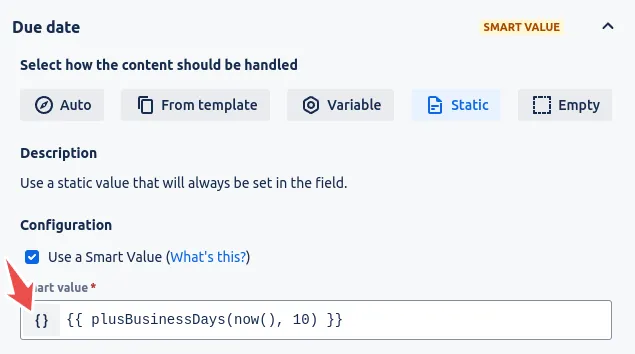 A static date or user field showing the Use a Smart Value checkbox and the curly-brace button that opens the playground.
Open the Smart Value Playground
Click the button next to the expression field. The Smart Value Playground opens, with the full reference for expressions and a live test that shows you the resolved value for a sample input.
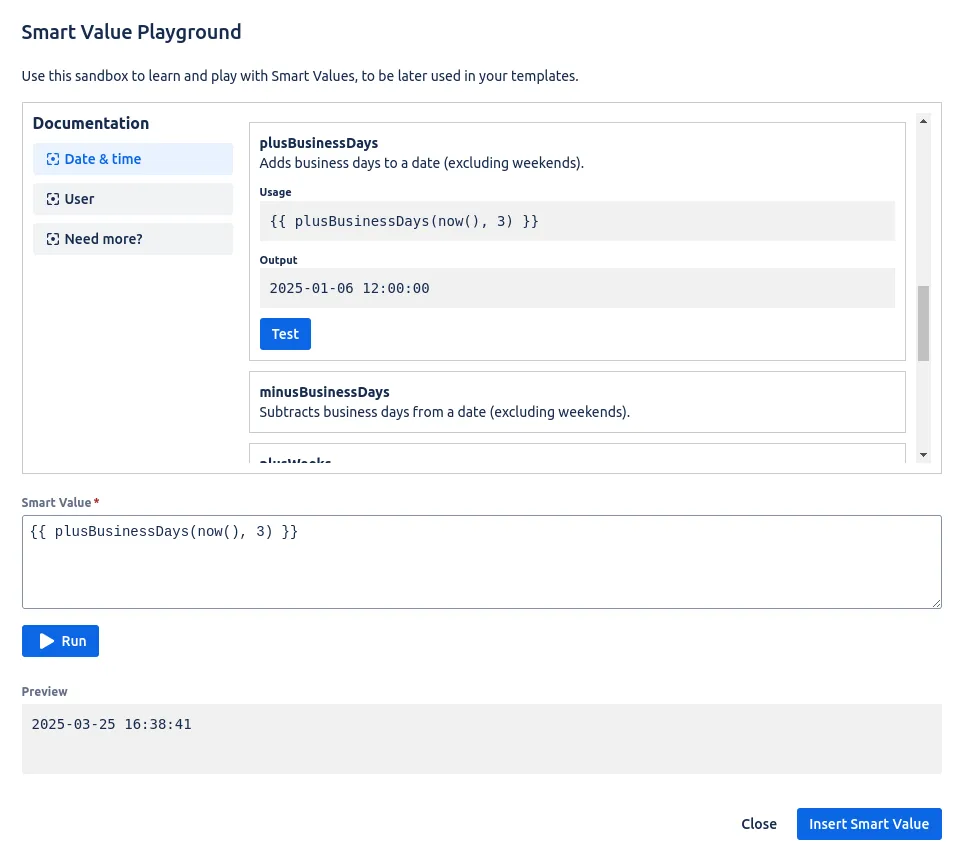 The Smart Value Playground lists every supported function and previews the resolved value for a sample input.
Write the expression and save
Enter the expression. Click Save on the template. From the next launch onwards, the field resolves to whatever the expression computes.
Common patterns
Assign the current user
To set the Reporter or Assignee to whoever is launching the template, use the user() function. It resolves to the Atlassian user currently signed in.
Set the due date relative to today
To compute a due date as “today plus N days”, use plusDays(now(), N). For example, plusDays(now(), 10) resolves to ten days from the launch instant.
Set a creation-time timestamp
now() resolves to the current date-time at launch. Useful for stamping the moment a ticket was created from a template, distinct from any subsequent edits.
Combine smart values and variables
A single template can mix smart values (computed at launch) and variables (filled by the user). For example, an Incident template can ask the user for the affected component (variable) while setting the reporter to the launching user (smart value) and the due date to “now + 4 hours” (smart value).
Where to find the full expression library
The Smart Value Playground (accessed from the { } button in the editor) contains the complete list of supported functions, with live testing. The patterns above cover the most common cases, but more sophisticated date math, user lookups and string composition are available there.
Related guides
- Creating variables in templates to capture values the user fills in at launch, which pair naturally with smart values.
- Prefilling the issue creation screen to see how resolved smart values flow into the create form.
- Advanced usage for the full feature set of the advanced template editor.
- Creating issue templates for the end-to-end basics of building a template.
Ready to template your Jira?
Install Process Templates for Jira on the Atlassian Marketplace. Free up to 10 users.