
Simple templates
Create a no-variable, no-frills Jira issue template in four steps. The fastest path from an existing issue to a reusable template.
What a simple template is
A simple template captures the shape of an existing Jira issue with no variables, no smart values and no per-field configuration. It is the right starting point for the most common ticket shapes your team launches, and it produces a real, reusable template in under a minute.
If you later need variables or smart values, you can promote any simple template to advanced without re-creating it.
Four steps from a Jira issue to a template
Start with an issue that already looks right
Pick an existing Jira issue whose structure you want every future ticket of this kind to inherit. Any project, any issue type. Alternatively, create a new issue specifically to use as a template source.
Open Save as new template
On the right side of the issue screen, click the three-dots menu and pick Save as new template. The template editor opens with every field from the source pre-populated.
 The Save as new template action sits in the issue actions menu and opens the template editor.
Choose which fields to persist
The editor lists every field that has a value on the source issue. Toggle each field on or off:
- On keeps the field in the template, with the value from the source as the default.
- Off drops the field entirely from the template.
For a simple template, leave defaults as static values. If you need a field to adapt at create time, that is what variables are for, and you can add them later.
Save the template
Give the template a clear name. The name is what your team will see in the launch picker, so something like “Bug report” or “VPN access request” is better than “Template 12”. Click Save template, and the template is in your library.
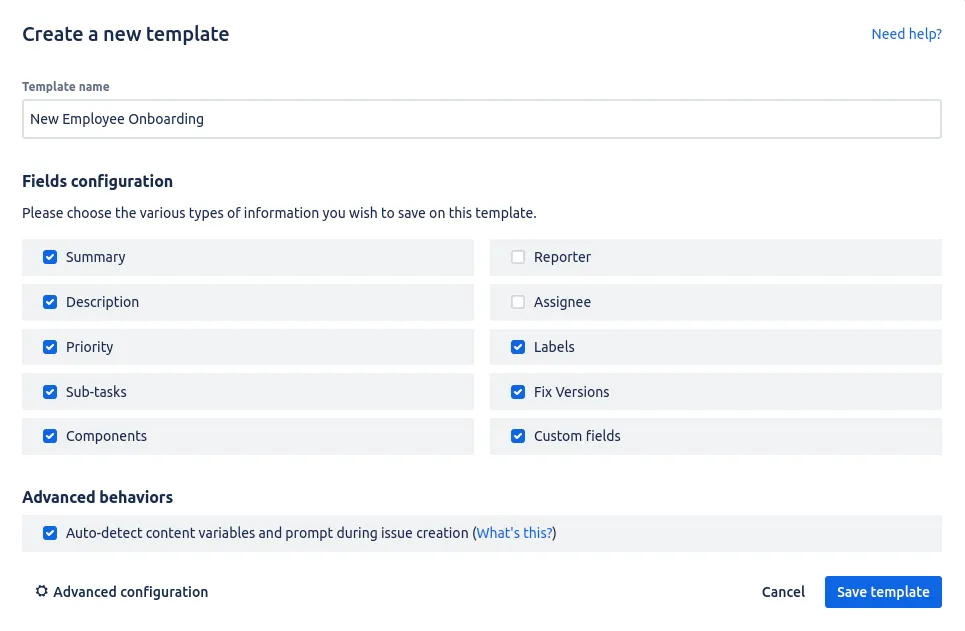 Name the template and click Save template to add it to your library.
What happens next
The new template is immediately available everywhere templates can launch from: the Create issue from template action in the Apps menu, the dashboard gadget, the prefill flow into Jira’s create-issue screen, and a Jira Automation rule. See using templates for the launch flow.
When to choose advanced over simple
Stay simple unless you need at least one of these:
- A field whose value should change per ticket (a variable).
- A date or user that resolves at create time (a smart value).
- A custom security level applied to the launched ticket.
- A sub-task list that shares variables with the parent.
If none of those apply, simple is faster and the result is identical for your end users.
Related guides
- Creating variables in templates to make a field adapt per ticket.
- Smart values for dates and users that resolve at create time.
- Using templates to launch your new template from the create flow or gadget.
- Managing templates to organise, edit and share your template library.
Ready to template your Jira?
Install Process Templates for Jira on the Atlassian Marketplace. Free up to 10 users.