
JQL searches with templates
Find every Jira issue created from a specific template using JQL. The templateKey field, search examples, and integration with Jira's standard query language.
What JQL is
JQL stands for Jira Query Language, the search language Jira uses for filtering and sorting issues. You can search by project, issue type, status, assignee, dates, labels, and almost any custom field. JQL underpins Jira’s Issue Navigator, the boards, the reports, and any saved filter your team relies on.
Templated issues are normal Jira issues
Every ticket Issue Templates creates is a real, native Jira issue. It is indexed by Jira just like every other ticket, which means it shows up in JQL searches, in dashboards, in reports, and in any third-party app that reads the Jira API.
You do not need a special search to find templated tickets. Standard project, status, and assignee filters work as expected.
Finding issues that came from a specific template
Sometimes you want to answer the question: “which tickets did my Bug template produce in the last sprint?”. For that, Issue Templates exposes a JQL field called templateKey that identifies the source template of an issue.
Search by templateKey
Open Jira’s Issue Navigator and run a JQL query that filters on templateKey:
templateKey = "BUG-TEMPLATE"returns every issue created from the Bug template.templateKey in ("BUG-TEMPLATE", "INCIDENT")returns issues from either of two templates.templateKey is not EMPTYreturns every issue that was created from any template.
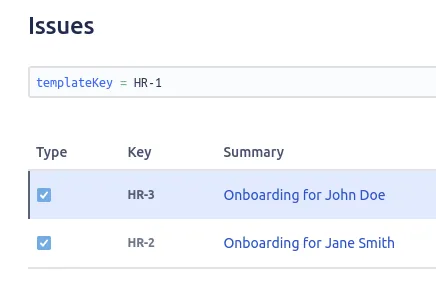 Filtering the Issue Navigator on the templateKey field to find issues created from a specific template.
The templateKey for each of your templates is shown on the Configure Templates screen.
Combine with other filters
templateKey is a regular JQL field, so it composes with the rest of JQL. Useful combinations:
project = "OPS" AND templateKey = "INCIDENT" AND created >= -7dreturns Incident-template tickets created this week in the OPS project.templateKey is not EMPTY AND assignee = currentUser()returns every template-created ticket assigned to you.templateKey = "ONBOARDING" AND status != Donereturns onboarding tickets still in progress.
Save the query as a filter
Once a JQL query is doing useful work, save it as a Jira filter and share it with the team. You can then drive boards, dashboards and reports from it.
Why this matters for analytics
Treating templated issues as first-class Jira issues lets you measure the impact of templates:
- Count how many tickets a template has produced in a given window.
- Compare cycle times between templated and non-templated tickets.
- Spot templates that are no longer in use and archive them.
For a hands-off way to scale ticket creation, see the Jira Automation integration, which fires templates on events without human intervention.
Related guides
- Surface template metrics on a dashboard gadget to visualise the JQL filters you save here.
- Create issues from templates to understand how the templateKey value gets stamped on each ticket.
- Managing templates to find the templateKey shown on the Configure Templates screen.
Ready to template your Jira?
Install Issue Templates for Jira Cloud on the Atlassian Marketplace. Free up to 10 users.