
Preserving links between issues
Keep issue links between a templated parent and its children (Blocks, Relates to, Duplicates) intact when a template launches.
Why link preservation matters
A complex template is rarely a single isolated issue. It is typically an Epic with several Stories underneath, where the Stories block each other in a defined order, or a sub-task tree where one branch depends on another. The whole point of a template is to replicate that structure faithfully.
Process Templates for Jira can carry the issue links between templated issues (Blocks, Is blocked by, Relates to, Duplicates) into the launched ticket tree, so the dependencies your team relies on for sequencing remain intact.
What link preservation does
When enabled, link preservation rewires every issue link inside the template to point at the freshly-created tickets:
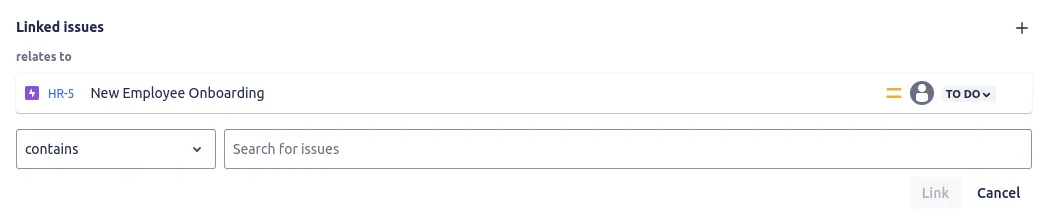 Links such as Blocks and Relates to are defined once between issues in the template.
- A “Blocks” link from Story A to Story B inside the template becomes a “Blocks” link from the newly-created Story A to the newly-created Story B in Jira.
- Links to issues outside the template (a ticket in a different project, for example) are preserved verbatim.
- Sub-task parentage is always preserved regardless of this setting; it is the cross-sibling links that this option controls.
How to enable it
During template creation, find the Preserve the links between issues checkbox on the template editor. Tick it before saving the template. The option is available on both simple and advanced templates.
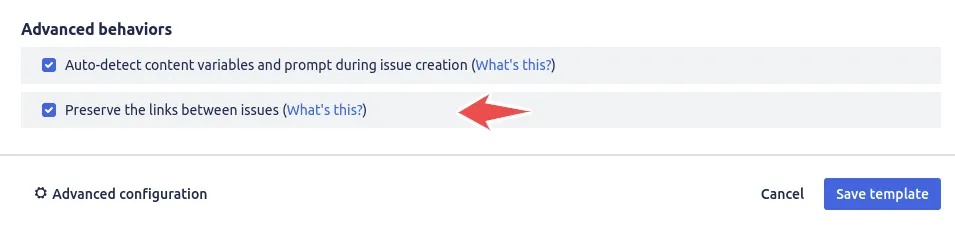 Tick the “Preserve the links between issues” checkbox in the template editor before saving.
Once enabled, every future launch of that template includes the link-rewiring step. Existing tickets created from earlier launches are unaffected.
When to leave it disabled
There are two cases where you might want link preservation off:
- The template references a one-off ticket in another project, and you do not want the launched tickets to link back to that one-off.
- You want each launch to be a fresh, unconnected tree, with no automatic cross-links between issues.
In both cases, leave the checkbox unticked. You can always toggle it later from the template’s edit view.
What about external links?
Links from a templated issue to an issue outside the template (a related issue in a different project, for example) are always preserved as-is. They point at the same external issue every time the template launches. Link preservation only controls the rewiring of links between issues inside the same template.
Related guides
- Create issues from templates to see how the full ticket tree is launched in one action.
- Build advanced templates with variables for structures that go beyond a single issue.
- Create issue templates for the basics of defining your Epic and Story hierarchy.
- Prefill the issue creation screen to speed up launching linked issues.
Ready to template your Jira?
Install Process Templates for Jira on the Atlassian Marketplace. Free up to 10 users.