One template,
a hundred Jira issues.

Issue Templates for Jira Cloud turns any Epic, Story, Task or Sub-task into a reusable template. Wrap fields in variables your users fill at create time. Launch from the issue menu, a dashboard gadget, or the create-issue screen.

30-day free trial · free up to 10 users · no credit card.

Employee onboarding Reusable template 1 launch

What it creates

Employee onboarding ONB-100
  • Accounts & access ONB-101
    • Create email & SSO ONB-102
    • Add to Slack & tools ONB-103
  • Workspace & equipment ONB-104
    • Order laptop ONB-105
  • First week ONB-106
    • Schedule intro 1:1s ONB-107
1 Epic · 3 Stories · 4 sub-tasks Use this template

Apply this template, get the whole onboarding hierarchy in Jira.

Used by 400+ teams across software, IT, HR and customer service, on Jira Cloud and Jira Service Management. 4.6★ (20 reviews)

Cloud Fortified

Loved on the Atlassian Marketplace

4.6 from 20 verified reviews

Real teams, real Marketplace reviews.

Read all reviews
“We started to use Issue Templates for Jira a few weeks ago and it was a game changer. It improved our Jira experience as a team and allowed non-developer users to create issues too: bugs, feature requests, even ideas for the future. Having a place where we can ensure conformity and produce a standard result is excellent.”
MT Marcelo Terres Jul 14, 2025
“We handle a lot of recurring work orders where the structure is always the same, only the scope changes. This app lets us create templates so we don't have to dig up old ones and adapt them every time.”
PH Pascal Hofmann May 11, 2026
“Being able to template the planning steps has eliminated multiple meetings and emails per event, giving time back to myself, my team and my entire reporting chain.”
JG Jack Ginther Oct 20, 2025

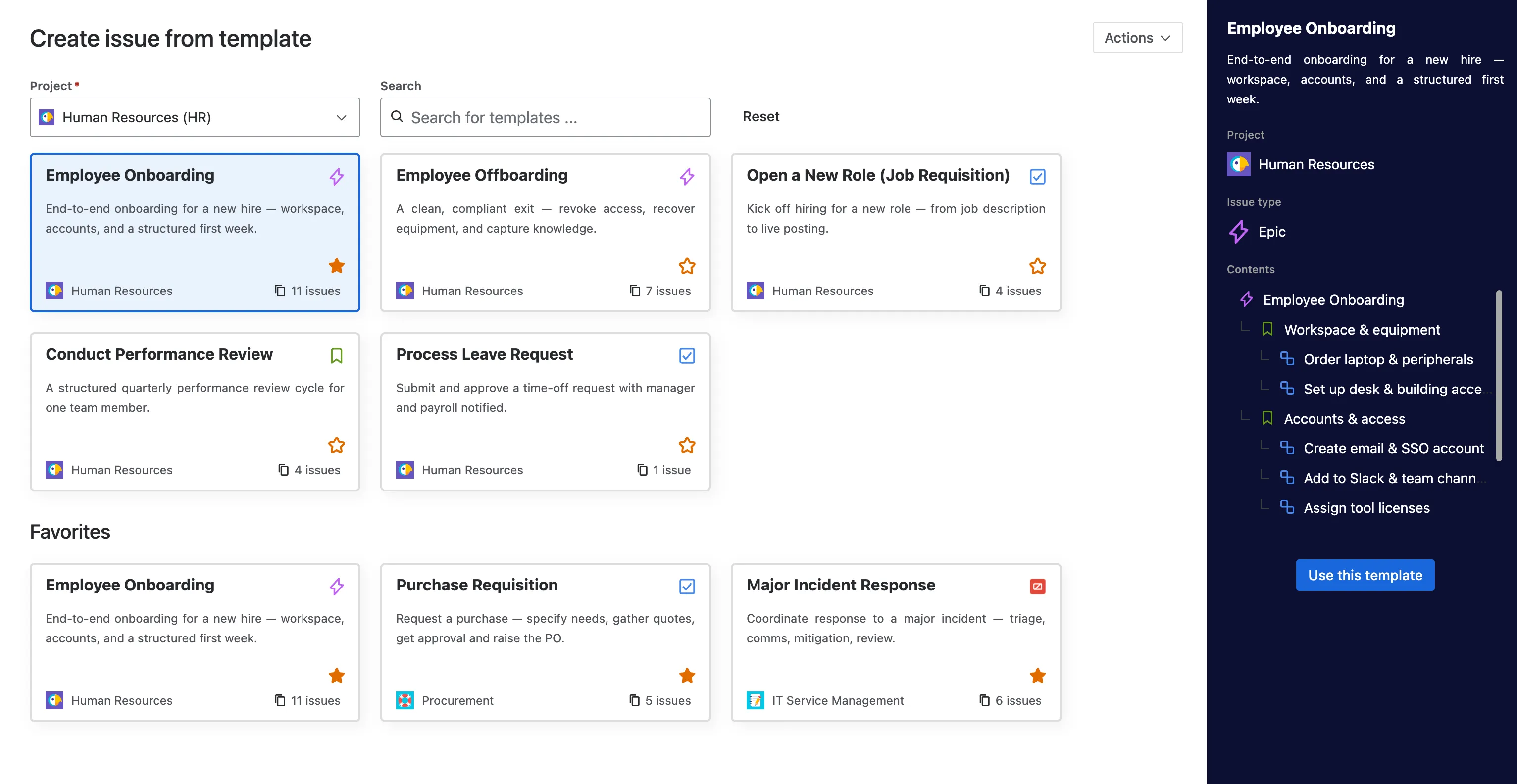
Template library

Every template your team builds, in one library.

Browse, search and favorite every reusable template, grouped by project, with the full issue hierarchy a click away. Stop hunting for that one ticket to clone.

Issue Templates library inside Jira, saved templates grouped by project with search and favorites, Jira template library
Search across projectsFavoritesGrouped by projectFull hierarchy preview

What you can template

Every field that matters. Variables where it counts.

Issue Templates copies what your tickets already look like, then lets you replace any value with a variable so users fill it in at create time. Templates and tickets stay in sync without manual upkeep.

  • Epics, Stories, Tasks, Bugs

    Every Jira issue type, plus Service Management requests.

  • Sub-task hierarchies

    Parent + child templates. Sub-tasks inherit variables from the parent.

  • Custom fields

    Text, dropdowns, multi-select, dates, user pickers, all templated.

  • Variables

    Free-text, dropdown, date. Define once, reuse across the whole template.

  • Smart values

    Fill date and user fields at launch, like the assignee or a due date a few days out.

  • Issue links

    "Relates to", "Blocked by", "Duplicates". Preserved between template-created issues.

  • Tempo Timesheet Account

    Native support for the Tempo Account custom field, prefilled per template.

  • Components & labels

    Defaults set on the template, optionally overridable at creation time.

How it works

From any Jira issue to a reusable template in three steps.

  1. Save as new template action in the Jira issue menu, creating a Jira issue template
    1

    Save any issue as a template

    Right-click any Jira issue, choose Save as template. Issue Templates copies every field, attachment and sub-task. Done. No new screen, no setup.

  2. Issue Templates variable configuration with text, dropdown and date field types, Jira template variables
    2

    Add variables for the bits that change

    Wrap the variables your users will fill in: customer name, due date, environment, severity. Choose text, dropdown or date. Variables are reusable across the parent and every sub-task.

  3. Template library with a selected template and its sub-task contents panel, launching a Jira issue template
    3

    Launch from the dashboard, the issue menu or create screen

    Your team picks a template and fills in the variables. Issue Templates can skip or prefill the standard Jira create screen, or create the issue directly. A template with sub-tasks creates the whole hierarchy in one launch.

What it does

The Jira template features you don't get natively.

Variables, full sub-task hierarchies, a dashboard launcher, and JQL search by template, none of which native Jira templates can do.

Variables

The same template, infinite variations.

Wrap any field in a variable. Text, dropdown, date. Your users fill it in at create time, the template structure stays consistent across every ticket your team launches.

  • Reusable across parent issue and every sub-task
  • Smart values: auto-fill date and user fields, like assignee or due date
  • Override defaults per-creation when you need to
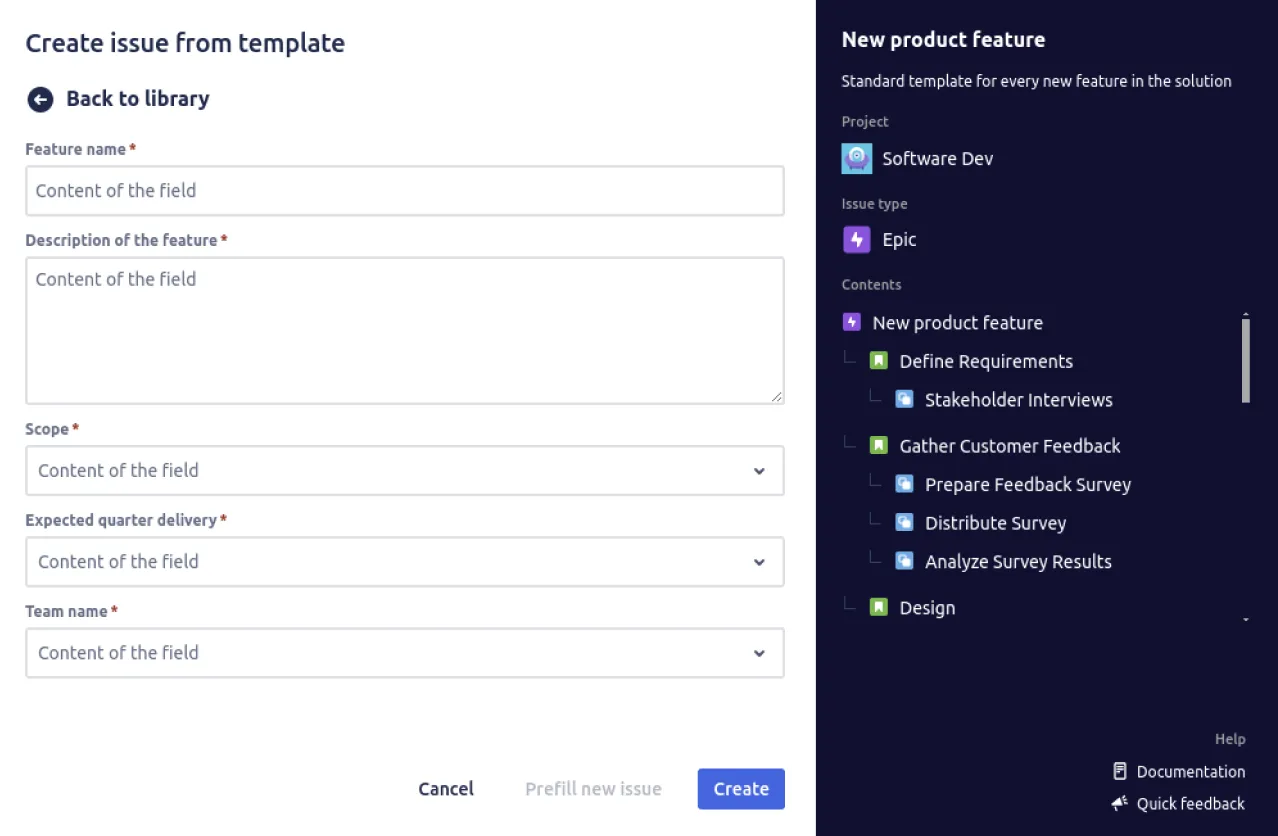
Issue creation screen with template-driven fields, Jira template variables filled at create time

Parent + sub-task templates.

Build a template once with its full sub-task list. One launch creates the parent and every child, with variables propagated through the whole tree.

  • Customer onboarding Epic
  • Kick-off call Task
  • Provision account Task
  • Send welcome kit Sub-task
  • Schedule training Sub-task
1 Epic, 2 Tasks, 2 Sub-tasks from a single template launch.

Dashboard gadget

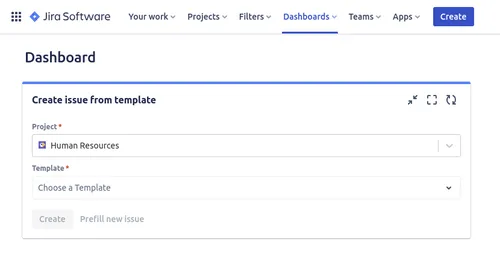
Add the Issue Templates gadget to any Jira dashboard. One click on a template, fill in the variables, ticket created. No menu diving.

Create issue from template gadget on a Jira dashboard, Jira dashboard gadget

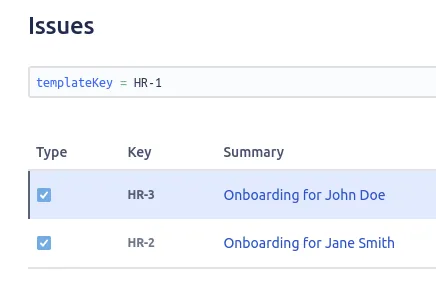
Track templates with JQL

A JQL function finds every issue created from a given template, so you can build saved filters, dashboards and reports around the templates your team relies on.

JQL search matching issues by templateKey, find issues created from a template

Anatomy of a template

Three layers, one repeatable ticket.

Every template is built from three layers: the bits that never change, the bits the user fills in, and the bits Jira computes. Together, they let one definition turn into hundreds of consistent tickets.

01 literal

Fixed structure

The shape your team always wants: which fields are present, which sub-tasks chain underneath, which issue links carry across.

Issue type Bug
Component Checkout
Labels regression, paid
02 user input

Variables

The bits that change per ticket. Wrap any field in a variable: text, dropdown or date. Reuse the same variable across the parent and every sub-task.

Summary browser
Severity severity
Due date due
03 computed

Smart values

Date and user fields that fill themselves in at launch. Set the assignee to whoever creates the ticket, or a due date a few days out. Jira computes them, nobody types them.

Assignee user()
Due date plusDays(now(), 10)
Created now()

Composed

When the three layers come together.

One template definition. Your team fills the variables; Jira computes the date and user fields. The ticket below is what gets created: the variables your team typed, plus smart values filled in automatically.

Created issue
Summary [Bug] Checkout button broken on Safari 17 Assignee Marie L. Due date Jun 15, 2026
Legend: variables smart values

Why teams choose us

Secure, simple, and priced for every team.

Security

Built on Atlassian Forge and Cloud Fortified, with template data stored in the EU (Frankfurt) and no personal data retained. We also take part in the Atlassian Marketplace Bug Bounty Program.

Onboarding

Simple to learn. Save your first template from any existing Jira issue in a click, with no technical setup and no dedicated admin project to configure.

Integration

Works natively inside Jira Cloud and Jira Service Management, with a dashboard gadget, JQL search by template, Jira Automation support and the Tempo Account field.

Affordable

Free for up to 10 users, then 0.50 USD per user per month on your standard Atlassian invoice. Every paid plan starts with a 30-day free trial.

Why teams switch

Standardize Jira tickets,
without the busywork.

Re-typing the same fields kills momentum. Issue Templates locks the structure once, then your team launches consistent tickets in seconds, not minutes.

Templates from real issues

Pick any existing Epic, Story, Task, Bug or Sub-task in your project and turn it into a template. No re-typing fields, no second tool to manage. The template inherits everything that was on the source.

Variables, not duplicates

Wrap any field in a variable and your users fill it in at creation time. Text inputs, dropdowns, date pickers. Reuse the same variable across the parent issue and every sub-task in one go.

Native Jira UX

The app lives where Jira users already are. Project sidebar, dashboard gadget, and the create-issue prefill. No new dashboard to log into, no new menu to learn.

Cloud Fortified on Forge

Built on Atlassian's Forge platform with the Cloud Fortified badge. Atlassian-attested security and GDPR-aware handling, with template data stored on a dedicated EU backend (DigitalOcean, Frankfurt).

Native Jira vs Issue Templates

Jira's defaults aren't templates.

Jira lets you set default field values per project. That's not templates. There's no reusable issue blueprint, no variables, no dashboard gadget, no whole-hierarchy launch. Issue Templates fills those gaps without leaving Jira.

Capability
Native Jira
Issue Templates
Templates from existing issues
Default-value field configs only, no template object
Pick any issue, save as a template in one click
Variables filled in at create time
Not supported
Text, dropdown and date variables, reusable across sub-tasks
Dashboard gadget
Not supported
Launch any template from any Jira dashboard
Launch a full hierarchy at once
Manual, issue by issue
Epic, stories and sub-tasks created in a single launch
Forge platform, Cloud Fortified
Yes (Jira itself)
Yes, fully migrated to Forge in v2.0

Wondering how we compare to Deviniti or Smart Templates? 10x easier to learn, per our customers.

See every feature

Pricing for every team size

Free for small teams. Fifty cents a user after that.

Free

$0 up to 10 users

Every feature, capped at 10 users on your Jira site. No credit card.

Team

$0.50 per user / month

More than 10 users, billed on your monthly Atlassian invoice. 30-day free trial.

Per-user pricing drops as your team grows.

FAQ

Frequently asked questions

What does Issue Templates for Jira Cloud actually do?

It lets you turn any existing Jira issue into a reusable template. The template captures every field, attachment and sub-task. You can add variables (text, dropdown, date) that your users fill in at create time, then launch new tickets from the issue menu, a dashboard gadget, or the create-issue screen.

Which Jira issue types can I template?

Every standard Jira issue type: Epic, Story, Task, Bug, Sub-task, and Jira Service Management request types. Templates also support custom issue types defined in your project.

How are variables different from Jira default values?

Jira default values are set in project field configurations and apply to every newly-created issue in that project. Variables in Issue Templates are per-template, prompt your user at creation time, and can be reused across the parent and every sub-task in a template hierarchy.

Can I create many Jira issues at once from a template?

Yes. A template can hold a whole hierarchy, an Epic with its Stories and sub-tasks, so a single launch creates every issue in the tree at once.

Is the dashboard gadget really useful?

For teams that create tickets every day, it removes three clicks per ticket. Add the gadget to your team dashboard, surface your three or four most-used templates, and your team launches them without leaving the dashboard.

Is Issue Templates secure? Where is data stored?

The app is built on Atlassian Forge and is Cloud Fortified, which is Atlassian's highest reliability and security tier for Cloud apps. Your template data is stored on a dedicated backend we host with DigitalOcean in Frankfurt, Germany, inside the EU.

How much does Issue Templates cost?

Free for up to 10 users on your Jira instance. After that, $0.50/user/month on your standard Atlassian Marketplace bill, with volume discounts that lower the per-user price as your team grows. A 30-day free trial on every paid plan, no credit card to start.

Does it work with Jira Service Management?

Yes. Templates work for both standard Jira Cloud projects and JSM service desk projects. Service Request types, security levels and request channels are all preserved on the template.

Free up to 10 users, 30-day trial

Stop re-typing the same Jira ticket.

Install Issue Templates in two clicks. No credit card. Join 437+ teams already templating smarter.