
Standardize Jira tickets, and create them in seconds.
Turn any Jira issue into a reusable template, make the parts that change into variables, then launch one ticket or a whole batch in a single click.

Why teams pick it
Three things most Jira template apps do not do.
Configure every field, not just copy an issue
Most template apps clone an issue as-is. Process Templates for Jira lets you decide how each field behaves: free text, dropdown, date, reusable values and smart values, across the parent and every sub-task.
Launch whole hierarchies in one go
Template an Epic with its Stories and sub-tasks, links and all. Launching recreates the entire tree at once instead of rebuilding it issue by issue.
Create in bulk, from anywhere
Issue menu, dashboard gadget, prefilled create screen, or a Jira Automation rule. One click creates a single ticket, or a whole Epic with its stories and sub-tasks, dozens of issues, in one launch.
What it does
Grouped by what you are trying to get done.
Authoring
Stop rebuilding the same issue every week
Open any Jira issue, choose Save as template, and Process Templates for Jira captures every field, attachment, sub-task, link and description in one click. Refine it later from the side panel. The work you already do becomes a reusable starting point.
Browse ready-made starting points in the template library
Dynamic content
One template, consistent tickets every time
Wrap the fields that change in variables: free text, dropdown, date, or a reusable value shared across fields. Smart values fill date and user fields at launch, like the assignee or a due date relative to today. The structure stays consistent; only the details change per ticket.
See variables at work in the bug report template
Launch & bulk-create
Create one ticket, or fifty, from wherever you work
Launch templates from the issue menu, a dashboard gadget, the prefilled create screen, or a Jira Automation rule. A single launch can create one ticket or a whole Epic-and-sub-task hierarchy at once. Fewer clicks, fewer missed fields.
Surface go-to templates from the library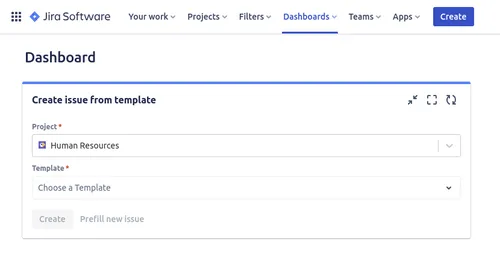
Structure & governance
The table-stakes, handled.
- Full issue hierarchies. Parent Epic or Story with its whole sub-task tree, created in one launch. See an example
- Granular permissions. Control who can see, use, edit and delete each template at template, project or global level.
- Issue links preserved. Blocks, Relates to and Duplicates rewire to the new issue IDs as tickets are generated.
- Every Jira custom field. Text, selects, cascading, dates, user and group pickers, labels, team-level and Tempo fields.
See it in action
From library to created issue, in three clicks.
This is what your team actually sees, no training required. Browse the library, preview the structure, then fill in only the parts that change.
Browse
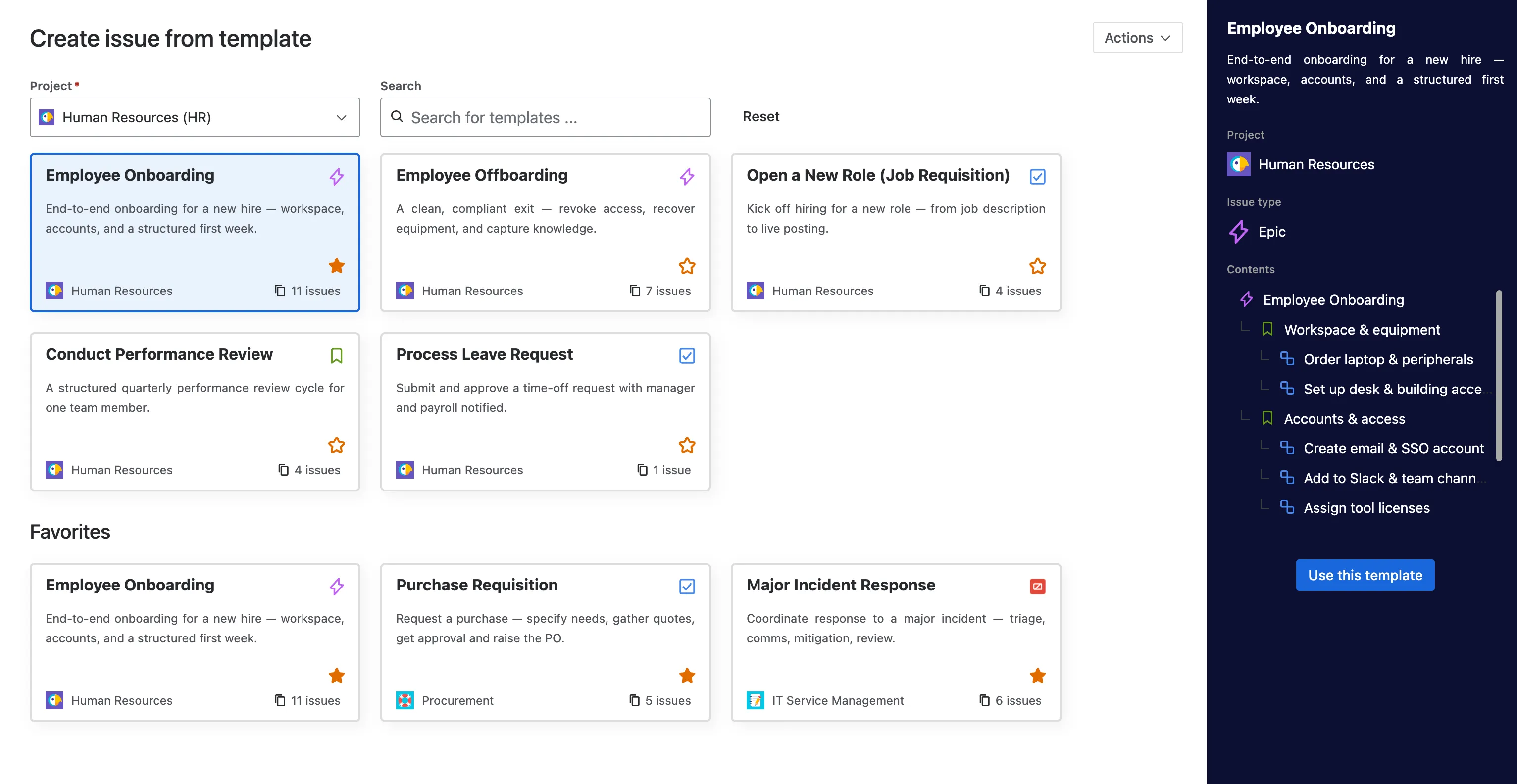
Pick from a library the whole team can use
Every template your admins build lands in one searchable library, grouped by project and starred for the ones you reach for most. No JQL, no menu spelunking, no blank issue screen to stare at.
Preview
See the full structure before you create anything
Open a template and the side panel shows exactly what it will create: the parent issue, its sub-tasks, the whole tree. One click on Use this template carries that structure straight into Jira.
Fill and create
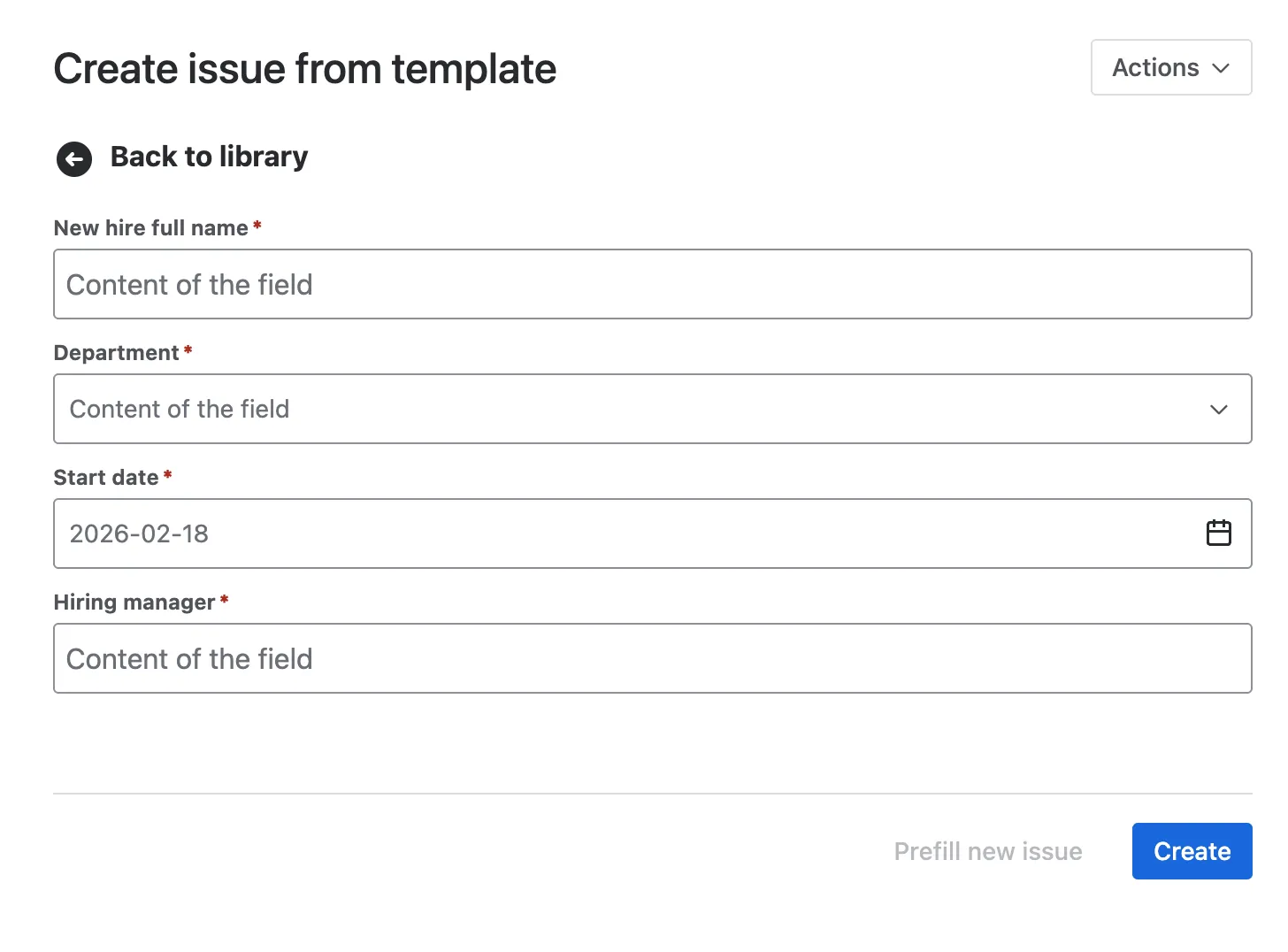
Fill in what changes, the rest is already done
The template asks only for the details that differ this time: a name, a department, a start date. Create the issue directly, or prefill the standard Jira screen first. The shape stays identical every time.
Questions
Feature FAQ.
What can you do with Process Templates for Jira?
Save any Jira issue as a reusable template, parameterize it with variables and smart values, template whole Epic-and-sub-task hierarchies, then launch tickets from the issue menu, a dashboard gadget, the create screen, or Jira Automation.
How do variables work in Jira templates?
Wrap any field in a variable and choose its input type: free text, dropdown, date, or a reusable value shared across fields. The same variable can drive the summary, description, custom fields and every sub-task, so one template adapts to each ticket.
Can I create a template for an Epic with its Stories and sub-tasks?
Yes. A template can hold a full hierarchy. Launching it recreates the parent and every child at once, with issue links preserved between them.
Can I create many Jira issues at once from a template?
Yes. A template can hold a whole hierarchy, an Epic with its Stories and sub-tasks, so a single launch creates every issue in the tree at once. You can also trigger templates from Jira Automation rules.
Where is my template data stored?
Process Templates for Jira is built on Atlassian Forge and is Cloud Fortified, Atlassian's top security and reliability tier. Your template data is stored on a dedicated backend we host with DigitalOcean in Frankfurt, Germany, inside the EU.
Loved on the Atlassian Marketplace
4.6★ from 20 verified reviews
Real teams, real Marketplace reviews.
“We started to use Issue Templates for Jira a few weeks ago and it was a game changer. It improved our Jira experience as a team and allowed non-developer users to create issues too: bugs, feature requests, even ideas for the future. Having a place where we can ensure conformity and produce a standard result is excellent.”
“We handle a lot of recurring work orders where the structure is always the same, only the scope changes. This app lets us create templates so we don't have to dig up old ones and adapt them every time.”
“Being able to template the planning steps has eliminated multiple meetings and emails per event, giving time back to myself, my team and my entire reporting chain.”
Template your Jira in five minutes.
Free for up to 10 users, 30-day trial above that, no credit card to start. Rated 4.6 from 20 reviews on the Atlassian Marketplace.