
What's new in Process Templates for Jira
Variables, per-field control, issue hierarchies, and a Forge rewrite, the biggest release ever for Process Templates for Jira. See what changed.
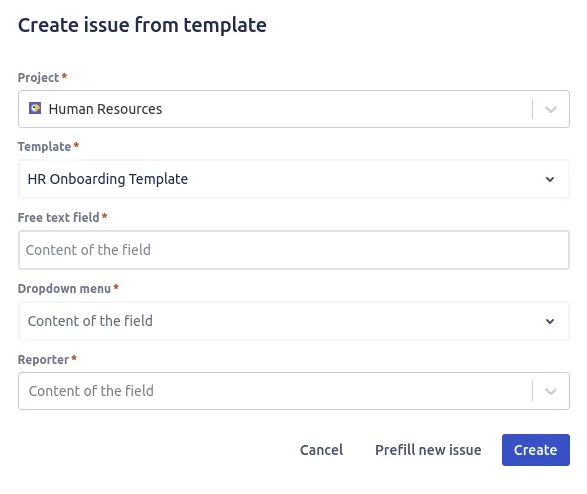
This is the largest release we have ever shipped for Process Templates for Jira. After months of work, the template editor, the variable system and the underlying architecture have all changed. If you create the same kinds of issues over and over, whether that is a bug report, a sprint story, an onboarding checklist or an incident record, this update is built to take more of that repetitive work off your plate.
Here is exactly what changed and why each piece matters for your team.
The short version
Last updated: 4 June 2026. If you only read one section, read this one. The headline changes in this release are:
- Variables you fill in at create time (free text, dropdown and date), so one template covers many situations.
- A rebuilt editor with per-field control: prefill a value, expose it as a variable, or leave it open.
- A clearer hierarchy viewer for multi-level templates, from epic down to sub-task.
- A Forge rewrite under the hood for stability, performance and Cloud Fortified security.
Everything below is the detail. For the wider picture of what the app does, the features overview covers each capability in one place.
A rebuilt template creation editor
Each field now has its own behaviour: prefill, variable, or left open. We rebuilt the template creation screen from the ground up, and the old editor that treated every field the same way is gone. The new one gives you granular control over how each field behaves when someone creates an issue from the template.
For every field you can now decide whether to prefill it with a fixed value, expose it as a variable that the creator fills in, or leave it untouched so Jira applies its own default. That means a single template can lock down the things that should never change (issue type, the structure of a description, a standard set of acceptance criteria) while still prompting for the handful of details that differ each time.
If you are setting up your first template, the step-by-step guide to creating issue templates walks through the editor field by field. For the broader workflow, getting started covers installation and your first save.
Variables you fill in at create time
Picture a bug template that asks for “Affected version” as a dropdown when someone creates the issue. The reporter picks a value, the rest of the report is already in place, and you get a complete, consistent ticket every time. That is what variables do.
The headline feature of this release is variable support. Instead of editing a copied issue every time, you define variables once in the template and the people creating issues fill them in.
We support three variable types, each suited to a different kind of input:
- Free text for anything open-ended: a customer name, a release version, a short description.
- Dropdown for a fixed set of choices, so the creator picks from values you control rather than typing free-form text that drifts over time.
- Date for deadlines, target start dates or any field that needs a real calendar value rather than a string.
A single variable can also be reused across the parent issue and its sub-tasks. Define a version variable once and it flows into the epic title, every story description and each subtask, so the creator types it a single time and the whole hierarchy stays consistent. The full breakdown lives in creating variables in templates, and for dynamic values that resolve automatically, smart values shows how to pull in dates, users and field references without prompting at all.
Native and custom field support
Variables are no longer limited to the description. Both native Jira fields and your own custom fields are fully supported as variable placeholders.
Rather than reinventing field behaviour, the editor leans on the original Jira fields. When you mark a field such as Assignee, Components, a custom Severity dropdown or a Story Points number as a variable, the create-issue screen prompts for it using the real Jira control. The creator gets the validation, the picker and the option list they already know, and the issue is populated with accurate, properly typed data instead of free text that has to be cleaned up later.
This is what makes templates reliable for structured processes. An ITSM incident report can force a priority and an affected service, and an HR employee onboarding template can require a start date and a hiring manager, all through their native fields. You can browse more starting points in the template library.
A clearer hierarchy viewer
When a template spans an epic with stories, tasks and sub-tasks, you need to see the whole structure at a glance. The updated hierarchy viewer lays out every level of the template and lets you drill into any node to configure it independently.
Each issue in the tree keeps its own field settings, its own prefilled values and its own variables, while the viewer keeps the parent-child relationships visible so nothing gets lost. The links between issues are preserved when the hierarchy is created, so the epic, its stories and their subtasks come out connected exactly as designed. Preserving the links between issues explains how that works, and creating epic templates is a good example of a multi-level structure in practice.
What else ships in this release
The new editor and Forge foundation also unlock the features many teams ask for first:
- Prefill or skip the create screen. Show the populated create-issue screen for a final review, or skip it entirely and create the issue in one click. See prefilling the issue creation screen.
- Dashboard gadget. Launch your most-used templates straight from a Jira dashboard. See the dashboard gadget.
- Find issues by template with JQL. A
templateKeyJQL field locates every issue created from a given template, for filters, dashboards and reports. See JQL searches with templates. - Tempo Timesheet Account support. The native Tempo Account field is supported in templates. See Tempo Timesheet.
- Dark mode, so the editor matches your Jira theme.
A Forge rewrite for stability and performance
Underneath the new features sits a complete architectural rewrite. Process Templates for Jira now runs on Atlassian Forge, which is why this release feels faster and more stable than anything before it.
This release has real consequences for you beyond speed:
- Your template data is stored on a dedicated backend we host with DigitalOcean in EU data centres in Frankfurt. The app stores no personal data.
- The app is Cloud Fortified, the certification Atlassian grants to apps that meet its highest bars for security, reliability and support.
- Updates roll out through the Marketplace without you managing any infrastructure.
If data residency and security are part of your evaluation, privacy and security and the issue security article cover the details, and permission handling across project and global scopes is documented in handling permissions.
Pricing stays simple
None of this changes how the app is priced. Process Templates for Jira is free for up to 10 users. Above that it is 0.50 USD per user per month through the Atlassian Marketplace, with volume discounts at 100, 250 and 1000 users. Every paid tier starts with a 30-day free trial and no credit card. Full details are on the pricing page.
Update now, or try it free
Around 400 teams already run Process Templates for Jira, with a 4.6 out of 5 rating across 20 reviews. The best way to see what this release does is to save one of your real issues as a template and create from it.
Already installed? If you are on an older version, the update rolls out through the Marketplace automatically, so there is no action needed. To confirm, check you are on the latest version in Jira under Manage apps.
Not yet installed? Install Process Templates for Jira from the Atlassian Marketplace, then follow the using templates guide to turn an existing issue into a reusable one. New to the app? Browse the template library for ready-made starting points.
If you want a hand or have a feature request, the support page is the fastest way to reach us. We read every piece of feedback, and a lot of what shipped here started as a request from a team like yours.
Frequently asked questions
Do I need to do anything to get the new version?
Is Process Templates for Jira free?
Found this helpful? Share it.
Ready to template Jira tickets?
Install Process Templates for Jira from the Atlassian Marketplace. Free up to 10 users, 30-day trial above that.